Voice
Voice capture
On-device speech recognition turns your spoken notes into text while you record.
AI Diary turns everyday voice notes into polished entries, todos, reminders, and milestones. It is built for daily reflection, work notes, ideas, and moments you do not want to lose.
The App Store download link will be added here after release. This page currently provides product information, review details, and user support.
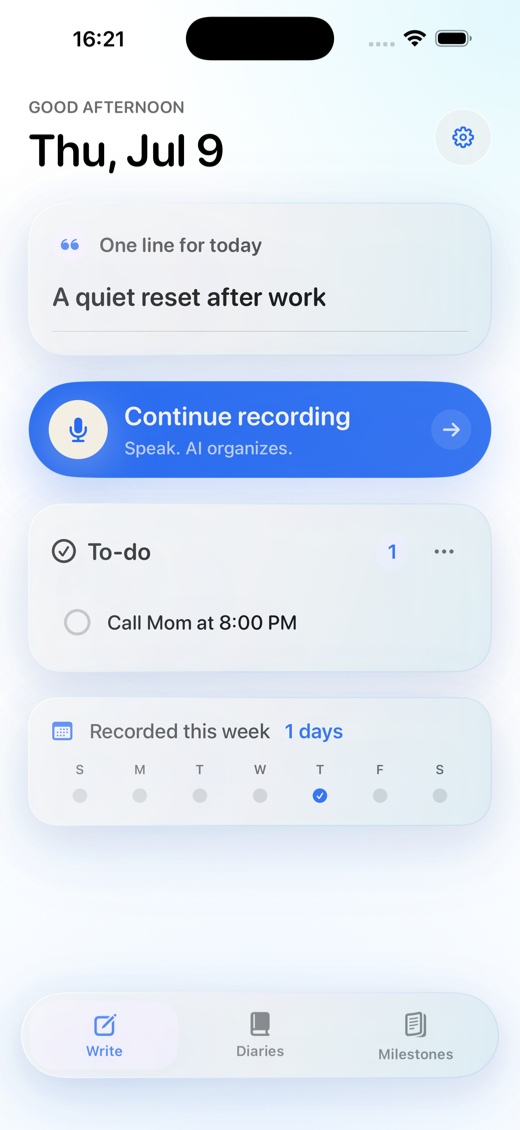
Talk naturally. The app helps turn your words into a journal you can actually revisit.
On-device speech recognition turns your spoken notes into text while you record.
Messy thoughts become a title, journal body, summary, tags, and highlights.
Clear actions can become todos and local reminders without manual sorting.
Important moments can be surfaced later so your journal becomes easier to review.
A quick voice note can become a journal entry, a todo, or a reminder before the moment disappears.

Speak a quick note about what changed, who owns the next step, and what needs follow-up.

Record what happened, keep the feeling, and let clear errands become reminders.

Capture a travel note, booking detail, or place to revisit while you are still on the move.
Confirmed journal entries are stored on your iPhone by default. The backend handles login, AI processing, subscriptions, and necessary usage metadata, not long-term storage of your journal body.
Free accounts can try the core AI journaling flow. Pro is for higher-frequency journaling, revision, milestone extraction, and ongoing reflection.
For review, support, or subscription questions, contact us by email.
Daily notes, work updates, ideas, emotions, todos, and reminders.
The app keeps the original transcript when possible and can fall back to a local draft so your note is not lost.
Email congheng@outlook.com or visit Support.